

Dragline toolbar
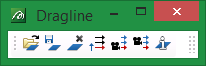
|
Icon |
Tooltip |
Description |
|
|
Open Dragline Setup |
Allows you to open or create a dragline specification file. Refer to the Dragline > Files > Open option for more information. |
|
|
Save Dragline Setup |
Allows you to save changes to the dragline specification file. Refer to the Dragline > Files > Save option for more information. |
|
|
Close Dragline Setup |
Allows you to close the dragline specification file. Refer to the Dragline > Files > Close option for more information. |
|
|
Advance Current Section |
Allows you to make the next dragline section (in order of section number) the current section. Refer to the Dragline > Sections > Advance Current option for more information. |
|
|
View Current Section |
Places the current section into a cross sectional 3D view. Refer to the Dragline > Sections > View Current option for more information. |
|
|
Change View |
Allows you to change the view by stepping to the next section. Refer to the Dragline > View > Change View. |
|
|
ID Block |
Allows you to display a block's parameters. Refer to the Dragline > Blocks > ID Block option for more information. |


