

Save Triangulation 
Use the Save Triangulation option to dump a series of triangulations created using the Triangles option, to a standard triangulation file.
This option can also be accessed by selecting the Save Triangulation button from the Grid Calc Advanced toolbar.
Instructions
On the Grid Calc menu, point to Model, and then click Save Triangulation to display the Dump Triangulation panel.
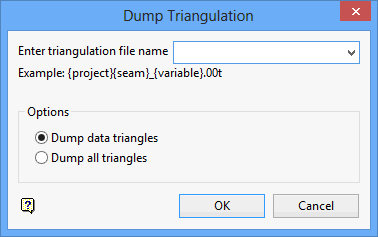
Enter triangulation file name
Enter the full file name (structure name) for the triangulation file. The file extension is added automatically.
If you enter 'TEST', then the file name will be 'TEST.00T'.
Options
Dump data triangles
Select this option to dump the triangles without the bounding polygon.
Dump all triangles
Select this option to dump the triangles with the bounding polygon.
Click OK.
The triangles are then dumped to the chosen triangulation file.
Was this page helpful?
