

Mapfile Run Macro
Use the Mapfile Run Macro option to invoke an existing macro without having to view it first.
Instructions
- Select Geology menu
- Select Drilling Utilities submenu
- Select Mapfile Run Macro option
The following panel displays.
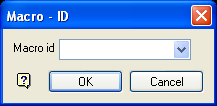
Macro - ID panel
Macro id
Enter, or select from the drop-down list, the macro id. All macro information is stored in the user id.mapfile_spec file.
Select OK.
The chosen macro is then invoked in a separate Report Window.
If you chose to save the mapfile statistics and/or mapfile generation information to a nominated log file, then the appropriate information will be written to the specified text file. Refer to the Macro Definition section of the Mapfile Build Macro documentation for more information.
Was this page helpful?
