

Create Slice
Create a Block Slice
The Create Slice option to create a block slice for the plane defined by a section line.
 Note
Note
A block model needs to loaded prior to selecting this option. If a block model hasn't been loaded, then you will be prompted to load one.
Instructions
- Select Geotech menu
- Select Section submenu
- Select Create Slice option
Select a section line. Once selected, the following panel displays.
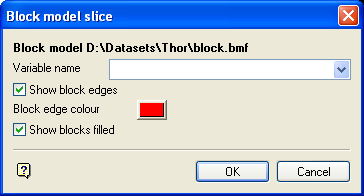
Block model slice panel
The name of the currently opened block model displays at the top.
Variable name
Enter, or select from the drop-down list, the name of the variable to be used for the slice.
Show block edges
Select this check box if you want the block edges to be shown. You will need to specify a colour for the block edges.
Show blocks filled
Select this check box to fill the blocks.
Select OK.
Upon acceptance, a list displays showing the colour legends that have been created for the Block scheme. Once a colour legend has been selected, the slice is generated and displayed in Plan view. The slice is stored as <wlayer><sectionname>.bsf.
