

Convert ODBC .dsf to Headered ODBC
On the Utilities menu, click Convert OSBC dsf to Header to display the following interface.
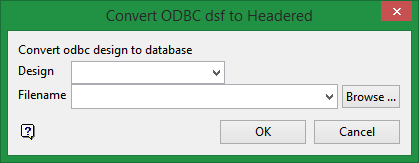
Design
Select the (.dsf)
file that needs to be converted from the drop-down list, or browse for
it using the Browse button.
Filename
Enter a name for the new database. The file may be called anything.
When a new database is created, the format
will be as follows: <id>.<dsn>.Isis
where
<id> is the identifier
<dsn> is the design name.
The
design name must be three characters. Note that the identifier
can be comprised of the project prefix with an optional additional identifier
<id> = <proj><odi>,
as was the case in previous versions of Vulcan.
Was this page helpful?
