

Export KML Design Strings
Use this option to export Vulcan objects (points, lines). Attributes exported: X, Y, Z. Coordinates are assumed as UTM, and are converted to Latitude and Longitude values. If the datum specified for the input objects is WGS-84, the conversion ends. If not, the coordinates are transformed using the Abridged Molodensky Coordinate Transformation Formulae to WGS-84. Current working Datums are (WGS-84), PSAD-56, SAD-69.
The output is a KML file. It defaults as a line object. Each input object creates a line in the KML file, and each point of those objects create a coordinate on the line object.
Instructions
On the File menu, click Ex port to display the Ex port panel.
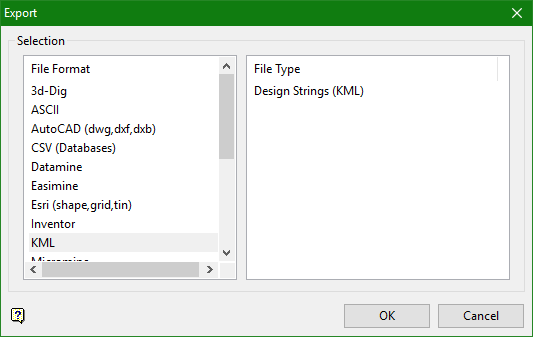
Click KML in the File Format column on the left, then select Design Strings (KML) from the File Type field on the right side of the panel.
Click OK to display the Ex port KML panel.
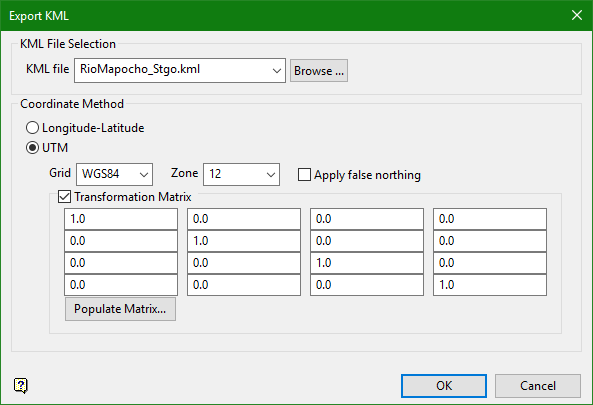
KML File Selection
KML file
Select the file that you want to export by using the drop-down list to display files stored in the current directory, or click Browse to select a different directory.
Coordinate Method
Longitude-Latitude / UTM
Select whether the coordinates are in Latitude-Longitude or UTM datum.
UTM
Use the drop-down lists to select the grid and zone for UTM datum.
Apply false northing
The false northing is used in the southern hemisphere mostly so northing grid coordinates are positive.
Transformation matrix
Select this option to apply the transformation matrix to input file, converting its coordinate datum.
Populate matrix
Click this button to import a selected (.EVN_TRAN) file to automatically populate the transformation matrix table.
