

Run
Run loaded animation
Use the Run option to play the currently loaded animation.
Instructions
On the View menu, point to Animation, and then click Run to display the Animation toolbar.
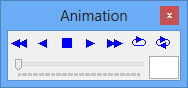
Use the buttons on the toolbar to view your animation.
| Icon | Tooltip | Description |
|---|---|---|

|
Play Backwards | Plays the animation backwards from the current frame. |

|
Previous Frame | Moves to the frame immediately prior to the current frame. |

|
Stop Animation | Stops the animation. |

|
Next Frame | Moves to the frame immediately after the current frame. |

|
Play Forwards | Plays the animation forwards from the current frame, stopping at the end. |

|
Cycle Play Forwards | Runs the animation continuously from the current frame. Once the end is reached, the sequences starts again from the start. |

|
Cycle Forwards then Backwards | Runs the animation continuously forwards and then backwards in a loop. |
| n.a | Frame Slider | The check marks represent each frame in an animation. It is possible to move the slider to swap between frames in the animation. |
| n.a | Frame Identifier | This contains the identifier for the current frame. |
Was this page helpful?
