

Perspective Mode 
Perspective mode, activated by clicking on the Perspective button on the Graphics toolbar, looks at the data from a specified point, which will change dynamically. Perspective mode is only for visualisation purposes, we recommend that you do not have it switched on when you are digitising.
In Diagram 1 a block model was displayed without perspective, in Diagram 2 the same block model was displayed with perspective. Diagram 3 shows the Overview Window of the block model with perspective. The apex of the pyramid is the point from which the data was viewed.
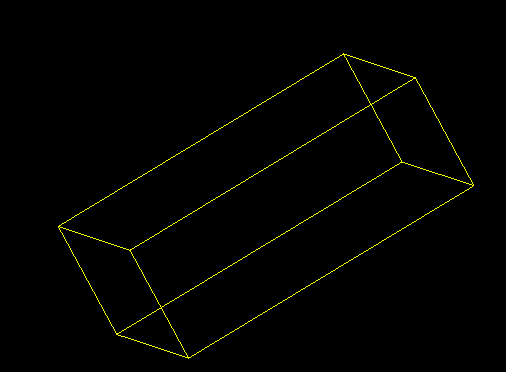
Figure 1: Perspective Mode off
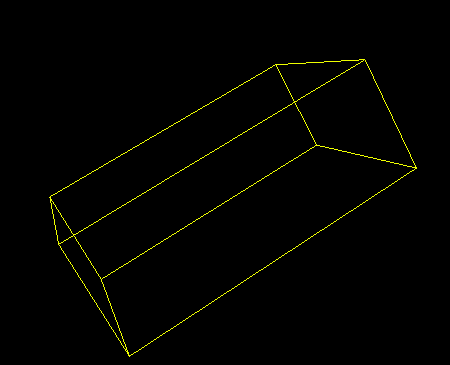
Figure 2: Perspective Mode on
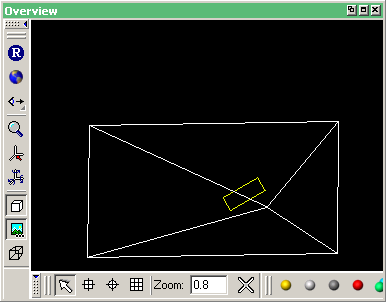
Figure 3: Overview Window (Perspective Mode On)
When zooming in perspective mode, three boxes are displayed to help you visualise the zooming process. All objects inside the smallest box will still be visible after the zoom. All objects outside the largest box will not be visible after the zoom. Objects between these two boxes may be visible, but it depends upon the depth of the zoom. The middle box represents the user defined area.
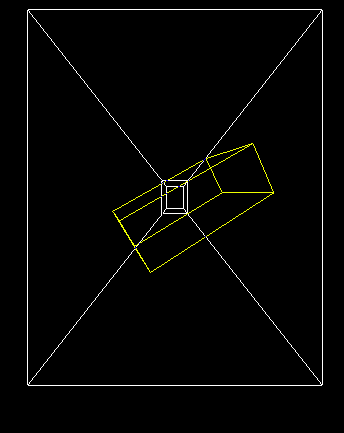
Figure 4: Zooming in Perspective Mode
Figure 5: View after Zooming
