

Mine blocks
Use the Mine blocks command to report on the proportion of a block that falls in a nominated triangulation(s). The 'mined-out' value, which can be reported as a percentage or fraction, will be written to a specified block model variable.
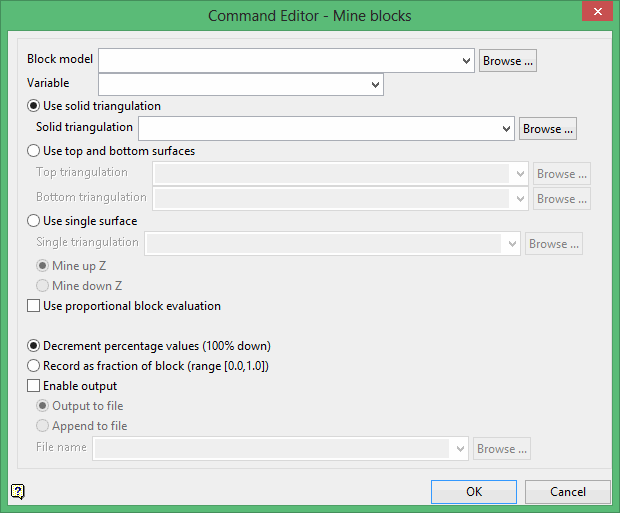
Block model
Select the block model that you want to write to.
The drop-down list contains all block models found within the current working directory. Click Browse to select a file from another location.
Variable
Select the variable that will be used to contain the percentage mined. The drop-down list contains all variables found in the nominated block model.
Specify whether you want to use one or more triangulations. When using the Use single surface option, you will be required to indicate whether to report on the percentage of a block that falls above or below the nominated surface triangulation.
The list contains all triangulations in the current working directory. Click Browse to select a file from another location.
To use a triangulation from an existing triangulation database, click Browse to locate the applicable triangulation database connection file (.tri). Once found, double-click on the file to display the Select Triangulation panel.
Click on the desired triangulation and then click OK.
Click OK to add the command and return to the Command Editor panel.
Decrement percentage values
Select this option to record the proportion as a percentage of the blocks remaining, that is, the percentage of each block inside the triangulation is subtracted from 100. This means that a block with a value of '0' has been fully mined, while a block with a value of '30' is 70% mined and 30% unmined.
Record as fraction of block range
Select this option to record the proportion as a fraction of the blocks mined. A block with a value of '0' refers to a block that has not been mined, while a value of '1' is used to represent a block that has been fully mined. A block with a value of '0.3' means that a block is 30% mined and 70% unmined.
Enable output
Select this check box if you want to redirect the information to a nominated file. You have the ability to overwrite or append to an existing file. To create a new file, enter the file name and file extension. By default, the resulting file will be stored in the current working directory. Use the Browse option to select a different file location.
Click OK to add the command and return to the Command Editor panel.
