

Block Model
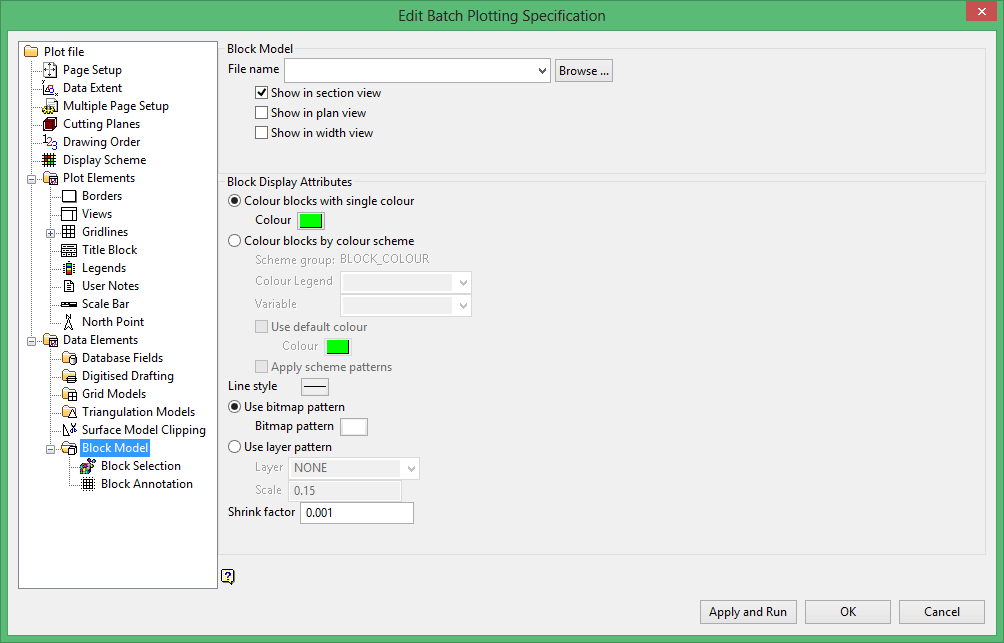
Block Model
File name
Select the block model that you want to include in the plot.
Select the views in which you want to include the selected block model.
Block Display Attributes
Colour blocks with single colour
Select this option if you want the block model to be a single colour.
Colour blocks by colour scheme
Select this option to use a scheme to colour your block model in the plot. You will need to select the colour legend and block variable from the drop-down lists.
Use default colour
Select this check box to specify the colour of blocks with the default value.
Apply scheme patterns
Select this check box to apply patterns to your block model.
Line style
Select the line style for the block model.
Use bitmap pattern
Select this option to use one of the hard coded patterns for your block model.
Use layer pattern
Select this option to use a user-defined pattern for your block model. You will need to specify the layer in which this pattern is stored and a scale factor for the pattern.
Shrink factor
Enter the shrink factor (or gap between blocks) as a fraction of the block dimensions. This will cause the block markers to 'shrink' away from each other, in order that the edges do not overlap.
