

Strat Profile
Generate Stratigraphic Profiles
The Strat Profile option allows you generate a series of profiles of the stratigraphic models for a given section line.
A stratigraphic file (<proj>strata.hzl) must exist as it is used to obtain a list of possible triangulated surfaces to profile. This file is created through using a text editor. See Appendix A for an example.
Note: This option can only be used when in Plan View.
Instructions
- Select Geotech menu
- Select Section submenu
- Select Strat Profile option
A list displays showing all of the available stratigraphic models. Select the horizon to profile.
Once selected, a dialog box displays.
Single Section
Select this option to create profiles for individual sections. You will need to pick the section you want to profile, this can be a single section or a long section. The profiles for the selected section will then be generated. Once generated, you will be able to select another section.
Multiple Sections
Select this option to create profiles for multiple sections. Selecting this option displays the following panel.
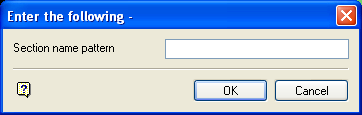
Section name pattern
Enter the name of the sections for which the profiles are to be generated. Wildcards (* multi-character wildcard or % single character wildcard) may be used.
PRE* to profile all sections whose name start with PRE.
Select OK.
If the pattern is valid, then the profiles will be generated for each of the triangulated surfaces and for each of the section and long section lines matching the pattern. All other profiles for non-matching sections are left unchanged.
