

Register
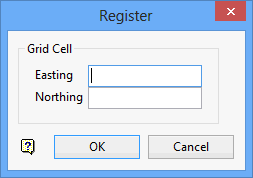
Use Register to set the current grid cell by specifying a northing and easting coordinate. The current cell will be set to the cell containing this point. The value of the cell displays in the Report Window.
Instructions
On the Grid Calc menu, point to Grid Query, and then click Register to display the Register panel.
Point
Enter the Northing and Easting values in the boxes provided. The current cell is set to the cell containing this point. A cell is the geographic region one cell size square to the North and East of a grid point (cell node). If the point falls precisely on a grid point, then the cell location displays in round brackets:
(column,row)
If the point does not fall on a grid point but in a cell, then the location displays in a less/greater than sign:
<column,row>
See the diagram below for an example:
Click OK.
The current cell is set. The value of the cell displays in the Report Window.
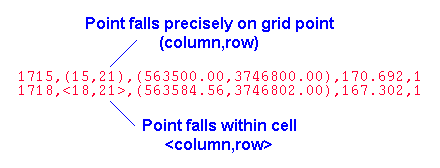
Figure 1: Report Window Output
