

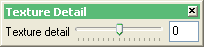
Texture Detail toolbar
|
Icon |
Name |
Description |
|
n.a |
Texture detail |
The system tries to optimise the resolution at which the texture displays. If the texture detail is too high, then the texture will take a long time to display. However, if the texture detail is too low, then the texture will appear pixelated. The slider lets you increase or decrease the resolution to provide either a faster display or greater detail. A slider value of '0' is normal, '-8' lowest detail (hence fastest display) and '8' greatest detail (slowest display). |
Was this page helpful?
