

Define Periods
Set Target Periods
Use the Define Periods option to define target periods. You can target against any grid. While the grid is usually a thickness (coal or overburden) grid, it may also be a tonnage grid, a $'s grid, an hours grid, etc.
A period is any length of time. It may be month, year, week or irregular lengths. Two target grids may be specified when targeting. When targeting, the first target met - grid 1 or grid 2, defines the end of the target polygon for that period.
Instructions
On the Rsvute menu, point to Reserves, and then click Define Periods to display the Define Periods panel.
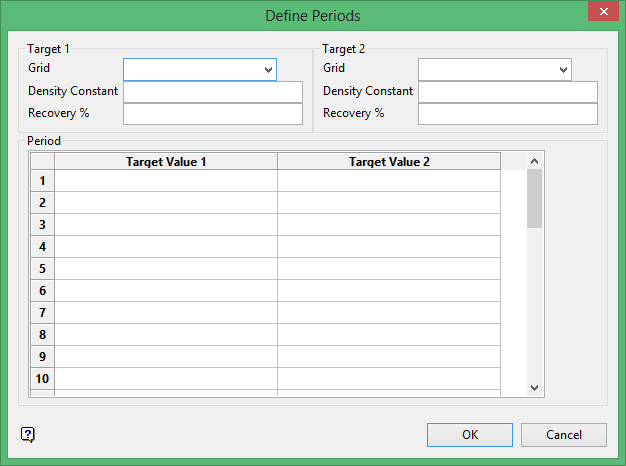
Target 1 and Target 2
Two target grids may be specified. For each specify the density, recovery and target values.
Grid
Enter, or select from the drop-down list, the grid file identifier and the model variable part (<gfi>.<mv>) of the target grid name. For example, H.TK (where H = seam and TK = thickness).
Density Constant
Enter the density value that is to be applied to the target grid. The density value can be used to convert volumetric grids to tonnages. It can also be used to change the units of a volumetric grid. For example, if the target grid is a thickness grid in feet, a density of 0.04 could be used to convert it to a tonnage grid, while a density of 0.037 could be used to convert the grid to a 'yardage' grid, allowing the targets to be specified in cubic yards.
Recovery %
Enter the recovery factor (specified as a percentage) that is to be applied to the target grid. A recovery (less than 100%) causes more material to be targeted to meet the required target value. The actual reserve in the target polygon equals the target value divided by the recovery percent.
Period
Target Value 1/Target Value 2
Enter target values for each target for each period. Target values must be specified in the correct units. The units are determined by the target grid and the density factor used. If a thickness grid is used and the density is ignored, then target values need to be in cubic feet or metres (depending on the coordinate system in use). If a density value is used, then the units of density determine the target units.
For example, i f a thickness grid (in feet) is used with a density of.04 tons/cubic foot, then the target value will be in tons.
Note: Before running the Target option, we recommend that you ensure that the units are consistent in both the Units and the Density options (under the Rsvute > Units submenu).
Click OK.
Use the Files > Save Defaults option to save the periods.
