

Validation Specifications
This option is identical to the Validate Data option under the Grid Calc > Integrated Stratigraphic Modelling submenu.
The Validate option to validate the data in the current Vulcan database, including ODBC Link databases, to ensure all data entries are legitimate.
This option allows for two types of validation:
| Method | Description |
|---|---|
| Field-by-Field Validation | This to check the contents of a specified field against a variety of possible entries for that field, for example, check if the logging codes are valid, if the data lies in certain ranges, and that data has been entered into a mandatory entry field. |
| Global Validation | This allows the contents of a field to be checked against the contents of all other occurrences of that field in the database, for example, the hole name and/or Easting's and Northing's for a hole will be checked against every other hole in the database. |
All errors encountered during the validation pass will be output to an error report file. For each error, the report file will list the hole name, the validation check that was failed, the table and field containing the error and list the data values that are causing the error.
This tool is also available as the isis_validate.exe executable. You will need to first set up a specification file using the Isis application, but the details can be changed once this has been done.
To obtain a full range of options available with this executable, type isis_validate.exe into the command line.
Instructions
On the Utilities menu, click Validate to display the Database Validation panel.
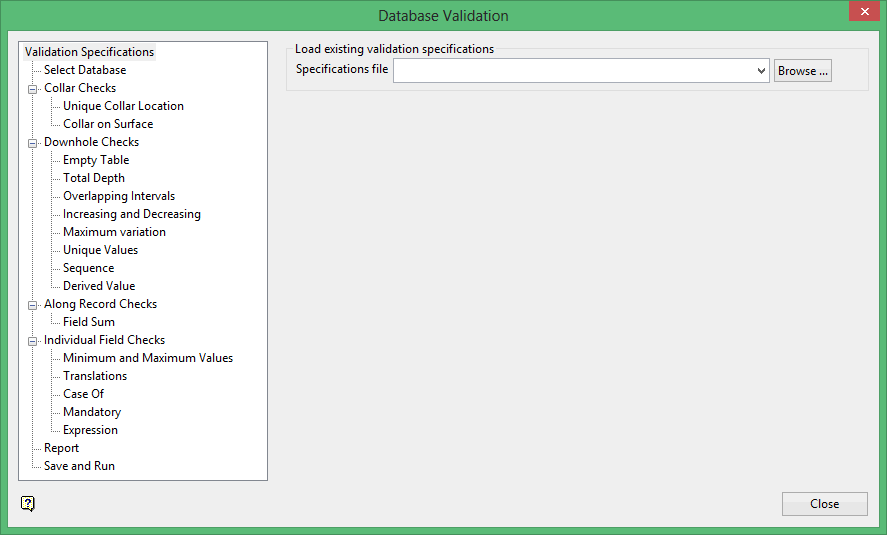
Specifications file
Enter, or select from the drop-down list, the name of the Database Validation Specifications file (.dbv) that you want to open. The drop-down list contains all of the .dbv files found in the current working directory. Click Browse to select a file from another location. Once a specification file has been chosen, the parameters contained in the nominated file will be used to populate the Database Validation interface.
To create a new file, enter the file name and file extension.
Related topics
- Validation Specifications
- Select Database
- Collar Checks
- Downhole Checks
- Empty Table
- Total Depth
- Overlapping Intervals
- Increasing and Decreasing
- Maximum Variation
- Unique Values
- Sequence
- Derived Value
- Along Record Checks
- Individual Field Checks
- Report
- Save and Run
