

Create Triangulation Plane
Use this option to create the triangulation that will represent a halo plane.
Instructions
On the Geotech menu, point to Analysis, then click Create Triangulation Plane.
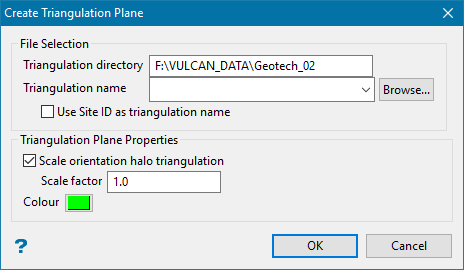
File Selection
Triangulation directory
This shows the current location of the folder in which the resulting triangulation will be stored. By default, it is set to the current working directory.
Triangulation name
Enter a name for the resulting triangulation.
Use Site ID as triangulation name
Enable this to use the SITEID from the displayed halo to name the resulting triangulation instead of having to provide a name for the triangulation.
Triangulation Plane Properties
Scale orientation halo triangulation
Use this to change the size of the triangulation.
Scale factor
A factor less than 1 will reduce the size; a factor of 1 will maintain the triangulation at the same size; and a factor greater than 1 will expand the triangulation.
Colour
Select a colour for the resulting triangulation.
