

Import Voxel From Geosoft
Instructions
On the File menu, click Import to display the Import panel.
Click Geosoft in the File Format column on the left.
Select Voxel from the File Type field on the right side of the panel.
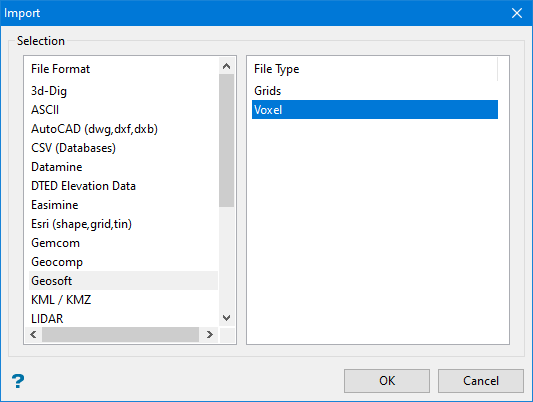
Click OK to display the Geosoft Voxel file Import Selection panel.
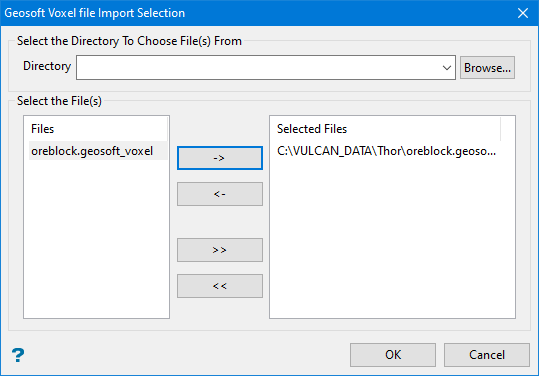
Select the Geosoft files that you want to import.
- Click the -> button to move the highlighted file(s) to the selection list on the right.
- Click the >> button to move all files to the selection list.
- To highlight multiple files that are adjacent in the list, hold down the Shift key while you click on the first and last file names in the list.
- To highlight multiple non-adjacent files, hold down the Ctrl key while you click on the file names.
- To remove files from the selection list, highlight the file name(s) and click the < button or click the << button to remove all files from the selection list.
Click OK.
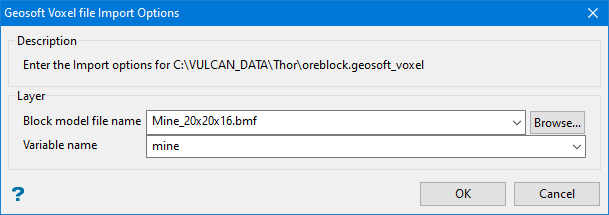
Block model file name
Select the block model
Variable name
Click OK.
Was this page helpful?
