

Preferences - Load Dynamic Model
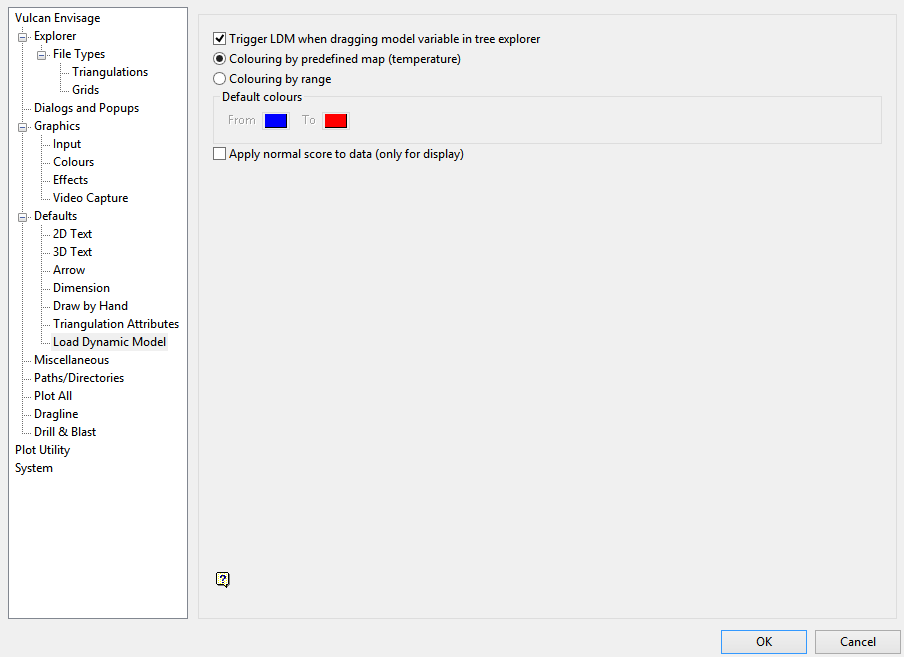
Trigger LDM when dragging model variable in tree explorer
Checking this option (the default) will cause a dynamic model to be loaded into Vulcan with default settings, with the exception of the colouring, which can be set in the preferences.
If this is unchecked, then only the extents of the model in Vulcan (classic behaviour) will be loaded.
Colouring by predefined map (temperature)
Selecting this option (the default) will set the colouring of the dynamic model to default to a temperature/grade map when using the loading by dragging method.
Colour by range
Selecting this option will set the colouring of the dynamic model default to a range colouring using the From and To colours in the preferences when using the loading by dragging method.
Default colours: From and To
These are the colours used by the dragging method when the option has been selected for Colour by range.
Apply normal score to data (only for display)
This will determine if the colouring will be the typical colouring (where all the blocks with the same real value will always have the same colour), or a colouring calculated using the data of the model after having a normal score applied to it (in which case, the blocks with the same real value may have different colours, because those colours are not calculated with the real data, but with the real data after going through normal score transform).
