

Load
Load an animation parameter file
Use the Load option to select and load an existing animation parameter file. An animation parameter file can be created through the Create option.
Instructions
On the View menu, point to Animation, and then click Load to display the Load Animation panel.
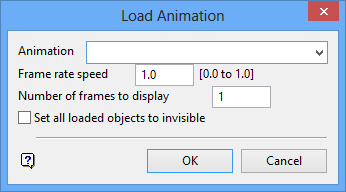
Animation
Select the name of the animation that you want to load. The drop-down list contains all of the animation files (.anim_seq) found within your current working directory.
Frame rate speed
Enter a value, between 0.0 (not changing) to 1.0 (change a full frame at a time), for the frame rate speed. The true speed depends on the speed of your machine and the amount of data in the animation file.
Number of frames to display
Enter the number of frames that you want to display.
For example, entering '1' displays the actors that are contained within the current frame, while entering '2' displays the actors contained within the current frame as well as those contained within the following frame.
Set all loaded objects to invisible
Select this check box if you want to hide all objects so only the actors in the current frame can be seen.
Click OK.
The chosen animation file is then loaded, and the Animation toolbar displays. Use the buttons on the toolbar to view your animation.
| Icon | Tooltip | Description |
|---|---|---|

|
Play Backwards | Plays the animation backwards from the current frame. |

|
Previous Frame | Moves to the frame immediately prior to the current frame. |

|
Stop Animation | Stops the animation. |

|
Next Frame | Moves to the frame immediately after the current frame. |

|
Play Forwards | Plays the animation forwards from the current frame, stopping at the end. |

|
Cycle Play Forwards | Runs the animation continuously from the current frame. Once the end is reached, the sequences starts again from the start. |

|
Cycle Forwards then Backwards | Runs the animation continuously forwards and then backwards in a loop. |
| n.a | Frame Slider | The check marks represent each frame in an animation. It is possible to move the slider to swap between frames in the animation. |
| n.a | Frame Identifier | This contains the identifier for the current frame. |
