

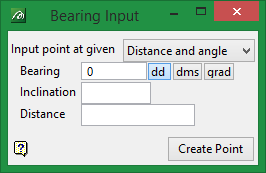
Bearing Input toolbar
|
Icon |
Name |
Description |
|---|---|---|
|
n.a. |
Input point at given |
The new point can be at a given angle, distance or distance and angle. |
|
n.a. |
Bearing |
The bearing value can be entered in Decimal Degrees or Degrees Minutes Seconds (ddd.mm.ss). For example, if you want to enter a bearing of 48 degrees, 39 minutes and 10 seconds, then you would select the |
|
n.a. |
Inclination |
Refers to the amount of deviation from the last digitised point. The inclination value needs to be entered in decimal degrees. A positive value results in the point being projected above the horizon, and a negative results in the point being projected below. |
|
n.a. |
Distance |
The units of measurement for the distance are specified in the job specification ( |
 button and enter '48.6516'. Values can be automatically converted by toggling the appropriate button.
You can choose to digitise a point using distance and angle or distance only or angle only. The last digitised point is used as the point from which to create the new point.
Tip: Use the C key to centre the view on the last digitised point.
The bearing is measured in degrees from North in a clockwise direction. The dip is measured in degrees from horizontal, angles should be between 0° and 90°.
To digitise a point using a distance and an angle.
- Digitise the first point.
- Select the Construct Line At Given Angle button
 .
. - Select your type of input, that is Distance and Angle, Distance or Angle.
- Enter the appropriate values.
- Select Create Point button.
