

Overview
Rsvute, the Interactive Grid Reserve Utility, produces highly accurate reserves from grid models and alleviates the prospect of reconciling a difference between the sum of the block reserves and the overall property reserve. Rsvute calculates reserves from digitised polygons, thickness grids, and/or structural surface grids. The flexible use of polygons allows you to include or exclude areas for each strata and variable or for the deposit as a whole.
Note Rsvute treats all polygons as having vertical walls.Each polygon used in the reserving process is subdivided (up to 32 times) until the area inside the polygon is completely included in the reserve calculation. Using this method for calculating reserves is the most accurate as grid cells that are cut by the reserving polygons are not considered as being either fully in or out. Grid cell regions outside of the polygon are ignored and the areas inside the polygon are completely reserved. Reserves are calculated for each grid on a cell by cell basis. The Reserves option (under the Geology > Grid Reserves submenu) calculates tonnages using an average horizon thickness. These reserves are not as accurate, but provide an additional set of numbers for comparisons.
Rsvute is designed to recall all of the information defined during geologic or mine modelling (in Grid Calc), so that you don't have to re-enter information, thus providing fast reserving with a minimum of setup. Rsvute is also flexible enough to allow for almost any reserving scenario. In addition to reserve calculations, Rsvute provides an easy to use method for target scheduling.
Prerequisites
Rsvute requires the following items to be set up:
- Set of grids
All grids are generally created in Grid Calc and must cover the same geographic area and have the same grid cell size. - Horizon table
A table (list) of horizons is defined through the Horizon List option (under the Geology > Drilling Utilities submenu) or the Horizon Table option (under the Grid Calc > Edit Modelling Defaults submenu). The horizon table names each horizon and specifies its priority. Crop layers for each horizon are also specified (crop layers are layers containing limiting polygons). The table and crop layer names are stored in the Grid Calc global specifications file (<proj>.gdc_glob) and read automatically when Rsvute is started. Within Rsvute this table can be checked through using the Horizon Parameters option (under the Reserves submenu). - Access to a design database
This is the database containing the limiting polygons. Limiting polygons are used to define the reserve calculation area. They are created using either the normal design options or Grid Calc (Contour or Polygon option under the Contour menu).
In Diagram 1, an elliptical horizon with an elliptical hole lies beneath a square horizon with a square hole. The limiting polygons are defined as clockwise (inclusion) and counter-clockwise (exclusion) polygons.
Areas in the clockwise polygon are included in the reserve calculation, unless cut by a counter-clockwise polygon. A donut is an excellent example. The outside edge would represent the inclusion polygon while the inside edge or hole would be the area excluded by the counter-clockwise polygon. The area shaded with vertical lines indicates the overburden area for the square horizon. The hatched region represents the interburden lying between the seams. The exclusion polygons do not need to be wholly contained in the limiting polygons.
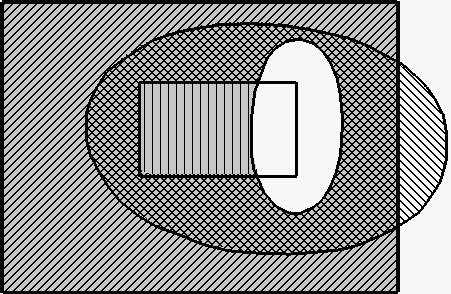
Figure 1: Limit and Exclusion Polygons
All seam limiting polygons must be stored in the same database. Multiple limiting polygon layers can be used simultaneously if each layer is named using the same convention.
For example, if you would like to run the reserve calculation using multiple limits such as: SEAM1_ASH.LIM, SEAM1_BTU.LIM and SEAM1_THK.LIM, type
SEAM1*.LIM
as the layer name in the Reserve Parameters panel.
To use the multiple layer option, all seams must have unique names. The polygons used for each horizon and variable are user selectable.
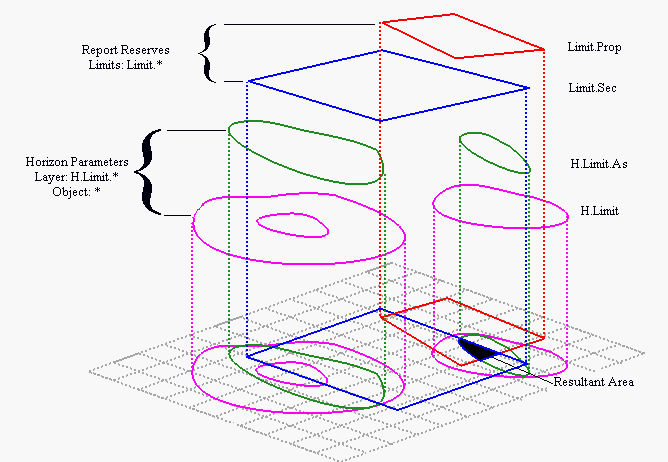
Figure 2: Effect of Limit Polygons
In the Horizon Parameters, polygons in a layer are unioned(or' ed). Multiple layers are intersected(and' Ed). In Report Reserves, polygons in a limit layer are intersected, i.e. each polygon acts as a new limit.
As mentioned above, Rsvute is designed to run after Grid Calc. This documentation therefore assumes that you have already set up the model parameters and that you are familiar with Grid Calc. The only items not defined by Grid Calc and that must be setup in Rsvute are:
- Variable Parameters
This needs only be done for the standard volumetric variables (Reserves > Variable Parameters option). All non-standard volumetric variables must be defined in Grid Calc with the Define Variables option. The Variable Type is the only parameter used by Rsvute. Unknown variables default to the type Quality. - Units
The default units of measurements for reporting purposes (Units > Units option). - Density
The default density constant (Units > Density option). - Classifications
The classification radii (Units > Classification option). - Precision
Precision values for reporting purposes (Units > Precision option).
You might find it helpful to also read the Procedure for Simple Reserving. Explanations of more involved techniques can be found in Appendix B.
