

Dynamic Volume Settings toolbar
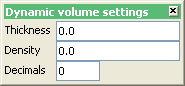
The Dynamic Volume Settings toolbar is used to control the thickness and density values for the current Vulcan session. When the dynamic volume functionality is in use, the current thickness and density values displays through the Status Bar.
Vulcan's dynamic volume reporting functionality can also be used through the following options;
- Design > Create > Polygon
- Design > Point Edit > Move
- Design > Point Insert > Insert
- Design > Point Insert > Replace String
|
Icon |
Name |
Description |
|
n.a. |
Thickness |
Enter the current thickness value. |
|
n.a. |
Density |
Enter the current density value. |
|
n.a. |
Decimals |
Enter the number of decimals that will be used when displaying the current thickness and density values through the Status Bar. |
Was this page helpful?
