

Working Section
Name the Working Layer
The Working Section option to define a working layer. All section lines and profiles, which are generated by the Survey Volumes menu, will be placed in this layer. Other options in this menu using the working layer are aimed at producing end area volumes.
Instructions
- Select Survey menu
- Select Survey Volumes submenu
- Select Working Section option
The following panel displays.
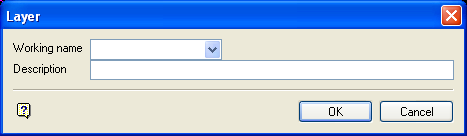
Layer panel
Working name
The maximum size of the layer name is 40 alphanumeric characters (spaces not allowed). Any already created working layers that are currently loaded can be selected from the drop-down list.
Description
Enter a description to further describe the contents of this layer. The description can be up to 80 alphanumeric characters and may include spaces. If a description is not entered, then a default description will be used instead. If the chosen layer already has an assigned description, the description displays when the layer is selected. Existing layer descriptions can be overwritten.
To add to an existing working layer, the layer must be loaded onto the screen. If a working layer by the same name already exists in the currently open design database but has not been loaded, then a dialog box displays asking you to confirm your selection. If you then select layer, the layer will automatically be selected from the current design database. If you select Replace, then the existing layer will be overwritten.
Select OK.
The layer is then opened and the name displayed in the Status toolbar. You can then start generating cross-sections and profiles.
