

Standardisation Settings
Use this option to set up standardisation for source database. Typically, there might only be one database set up required but there could be more than one standardisation requirement. The standardisation requirements could be, for example, different density fraction range for different facies of coal or for different types of mineral separation at the same site.
Instructions
On the Washability menu, point to Setup, and then click Standardisation Settings to display the following panel.
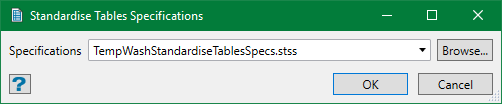
Select the specification file to be edited from the drop-down list or browse from another directory. By default, it is pre-populated with the last specification edited or set up.
You can also create a new specification file. Either leave the field blank, in which you will be prompted for a name when you save the specifications, or enter a new name here. The new name must be unique or it simply opens the existing data for edit.
Click OK and the Standardise Tables Specifications panel shows up. If a specification file is selected, the panel is automatically populated with the data from the file or else the panel is blank.
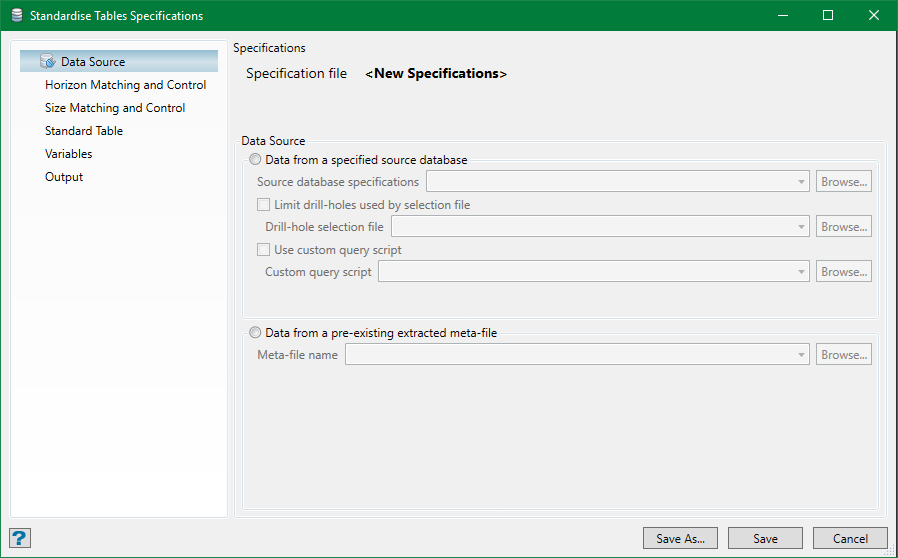
These are some options that need to be set up in the panel.
Data Source
This tab displays the path of the specification file selected for edit. As mentioned before, data can come from a user's database defined in the Source Database Setupsection or from a pre-exisitng extracted metafile.
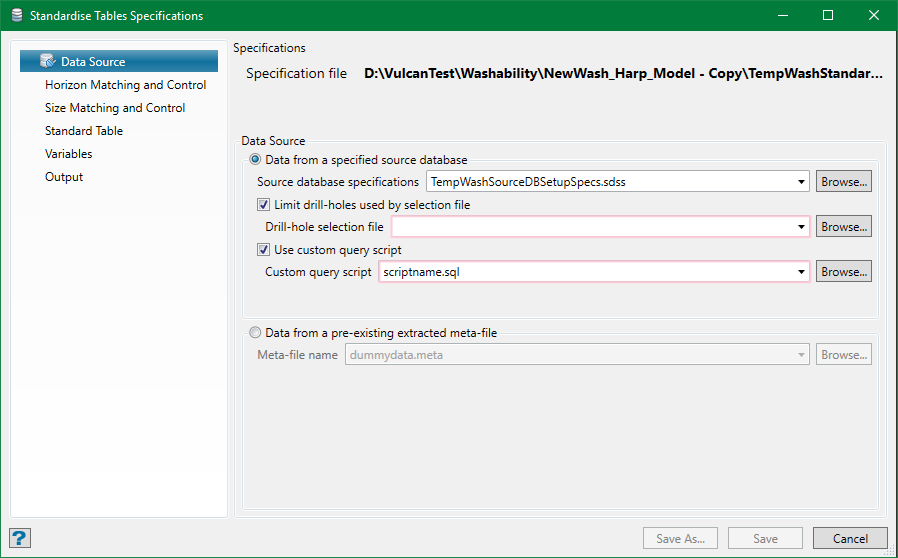
Data from a specified source database
Specify the database to use by choosing one of the source database specifications created with the previous setup option. This specifies the name of the database, the record and field connections, and data relationships required.
Limit drill-holes used by selection file
Optionally, the drillholes used from the database can be limited by selection file, eg. using different groups of holes for standardisation types.
Use custom query script
The required data is extracted from the database into a metafile by an automatically generated query script. Internally, this is using an Inquisitor script. Inquisitor is a Maptek proprietary relational database query system which allows an Isis flat file to be treated as a relational database. Advanced users may use their own scripts—in which case the only information used from the Source Database Setupis the database name/path. It also allows the use of SQL scripts. In either case, the script must generate a metafile matching the structure described in the appendix.
Data from a pre-existing extracted meta-file
A pre-existing metafile can be nominated optionally—in which case a source database setup specification is not required.
The metafile from each standardisation process is preserved after the run until another run of the same specification overwrites it. Therefore, these metafiles can be reused if required—thus allowing for manual editing if necessary but not recommended for lack of auditability. Alternatively, a user's own database and query system could be used to provide a metafile. In either case, the metafile used must maintain the structure described in the appendix and must have suffix.metato be selected by the panel widget.
Horizon Matching and Control
This panel controls which lithologies are to be used for creating a standardised database and how to handle them. It also allows for the definition of the treatment for any missing data. While the terminology Seam/Ply for the horizon selection seems to imply the expectation of stratiform deposits, there is however no reason that the Seam field designation cannot be used for any lithological ID.
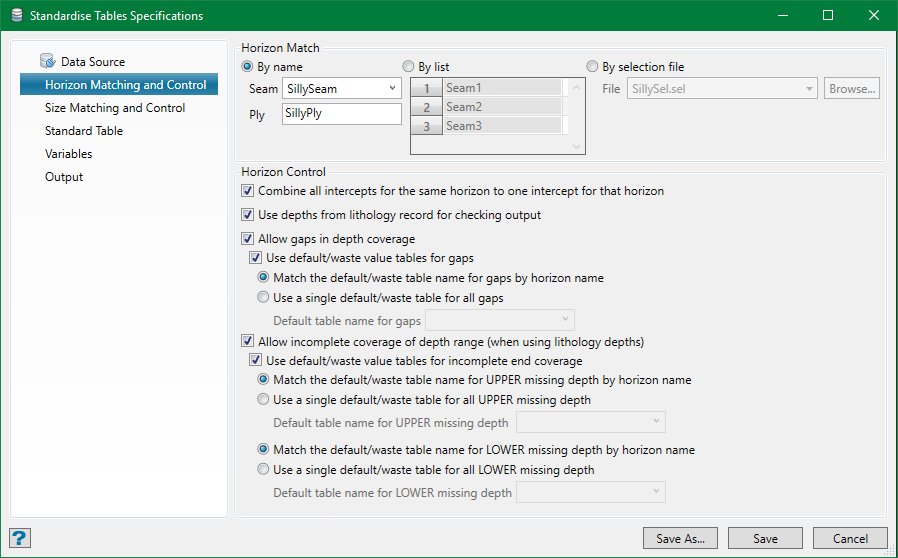
It is expected that all horizons defined in the source database will be standardised. However, this need not be the case if standardisation requirements vary for different lithology groups.
Horizon Match
By name
Horizons can be selected by seam and ply names. Standard Maptek wildcard can be used with these fields, eg. to select all horizons, set these fields to *, which matches everything.
Note: Ply match will only be available if a ply field is nominated in the Source Database Setupor indicated in the supplied metafile.
By list
Horizons can be specified by list. This is used for specific group of seams but wildcard can also be used, eg. a list containing two items D* and E* would select all the D and E group seams. It is not possible to refine by ply (if available) with this option.
By selection file
The selection file is essentially an extension of the list where the list is held externally in a standard selection file ( suffix.sel ) with one entry per line.
Horizon control
Combine all intercepts for the same horizon to one intercept for that horizon
Select this option to combine all matched contiguous intercepts into one. While there may be gaps in depth, there won't be any intervening differently named horizons from the match list. The combined wash tables for these horizons will be appropriately weighted to the average. Name matching is performed on both seam name and ply name (if a ply match is specified).
Note: A ply match name of * will match any ply but an empty ply match field will only match blank ply data.
Use depths from lithology record for checking output
This option is auto enabled if the source database is configured as a normal geological database with appropriate geological synonyms defined, otherwise it is disabled.
Often a table of sample records for a hole will not cover the full depth range of a particular lithology but only depth from the material taken as samples and analysed. This option allows to determine the full coverage of a horizon from the lithology.
Allow gaps in depth coverage
Any depth range within the sample depth coverage that is not covered by sample data is referred to as Gap.
Select this option to allow for gaps in the sample depth coverage in the hole. If this option is not selected, any horizon found with a gap will be rejected and hence doesn't form a part of the standardised database.
Select Use default/waste value tables for gaps option to apply a default wash table to the missing intervals (gaps). These defaults could either be a known set of average expected variables or could be a set of variables which reflect the waste nature of the material in order to dilute the product where, for example, a working section crosses a known interburden.
There are two ways to match the waste table, either by matching the table name for the missing horizon name (seam only) or by specifying a single table for all gaps. If a specified table (eg. by horizon name) doesn't exist, the material from the gap will play no part in the weighted average for that horizon.
Allow incomplete coverage of depth range
Any extra horizon depth above or below the sample depth coverage (meaning there is no sample data) is referred to as Incomplete coverage.
This option works similar to the gaps except that it uses lithology depths. It is enabled only if lithology depths are used as there is no other way to determine incomplete coverage. Like in the gaps, the horizon will be rejected when incomplete coverage is found unless this option is selected. However, an extra feature for incomplete coverage is that, if required, different defaults can be used for depth missing at the top of the horizon to the defaults used for depth missing at the bottom.
Size Matching and Control
The controls on this option are enabled only if there is size-fraction data available i.e. if the data source referenced is a database setup file which has size-fraction fields.
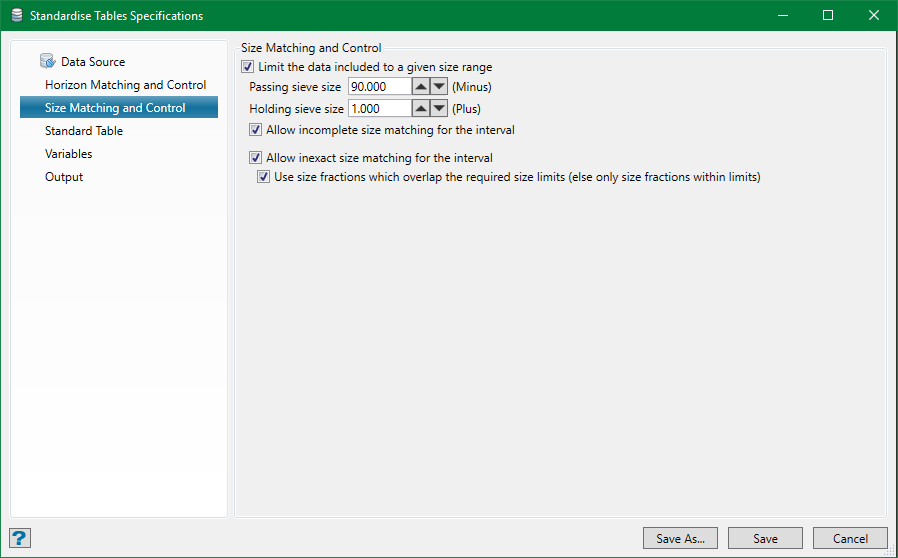
Limit the data included to a given size range
If size-fraction data is available and used in the data source but this option not selected, then the wash tables for all the available size-fractions for an interval will be combined (weighted average using the sample yield data, if provided) to produce the wash table for that interval.
Setting the size range will select only those wash tables for the size-fractions of a sample that fall into this range. In the example shown above, it might be that there is only one size-fraction measured (eg. 0.1–50.0) or there could be two or more (eg. 0.1–5.0 and 5.0–50.0, or 0.1–5.0, 5.0–15.0 and 15.0–50.0, etc.). All of these examples would match this requirement. However, as it is not possible to extrapolate gravity-separation behaviour for an unmeasured size fraction, the following options can be used to take the control of the data selection behaviour.
Allow incomplete size matching for the interval
If this option is not selected, the wash table for the interval will only be calculated if there are size-fractions covering the whole range. If this option is selected, the rules are slightly adjustable but the interval is still included if only part of the size range is covered.
Allow inexact size matching for the interval
If this option is not selected, the sizes available must match exactly with the end points of the range. If this option is selected, the size-fraction not matching the end points will be allowed assuming that Allow incomplete size matching for the interval is selected.
Use size fractions which overlap the required size limits
This option is enabled only if Allow inexact size matching for the interval is selected. This will include size-fractions which have only some part of their range within the range. Everything outside that is ignored.
Standard Table
This option is used to define the standard fraction densities to which the combined wash tables will be reshaped. It must contain the float fraction divisions and a final sink value, which is auto-populated to the last float density.
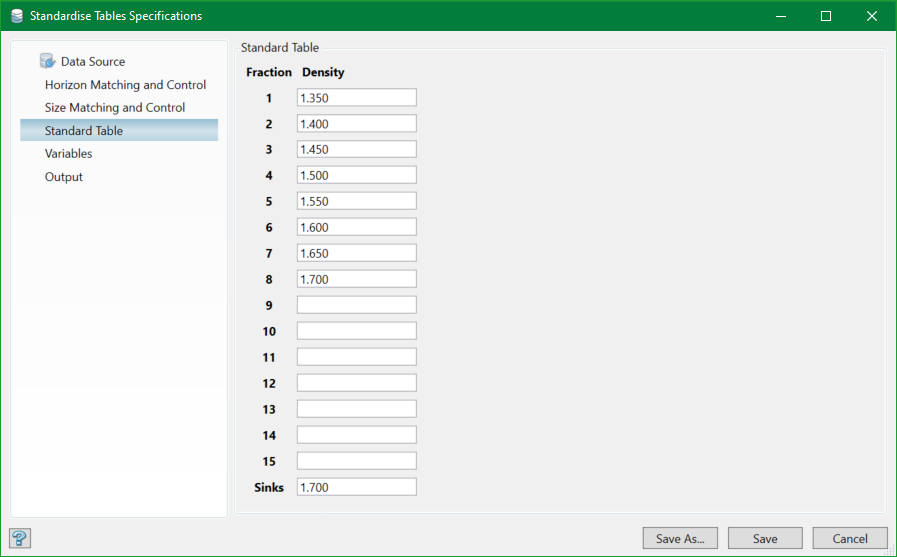
It is not always likely to extrapolate values for density fractions lower than those measured in the source data. It is therefore recommended to match the lowest fraction density to that measured or else some data may be skipped as reshape fails. Also, it is not possible to extrapolate values for density fractions higher than the final sinks.
It is better to maintain the fraction density range which maximises data selection, incorporating all measured data even at the expense of poorly sampled specimen.
Variables
This option is used to specify which variables are to be transferred with the standardised wash tables.
Note: If the standardisation run for which these specifications are to be used will result in a new output standard database being created, it will be structured to contain only these variables. If the intention is to append more holes and more variables to the same database at a later date, all of the required variables must be declared in the first run. Subsequent runs with different specs which will be appended to this database may only contain a subset of the variables (which must match by name) if required.
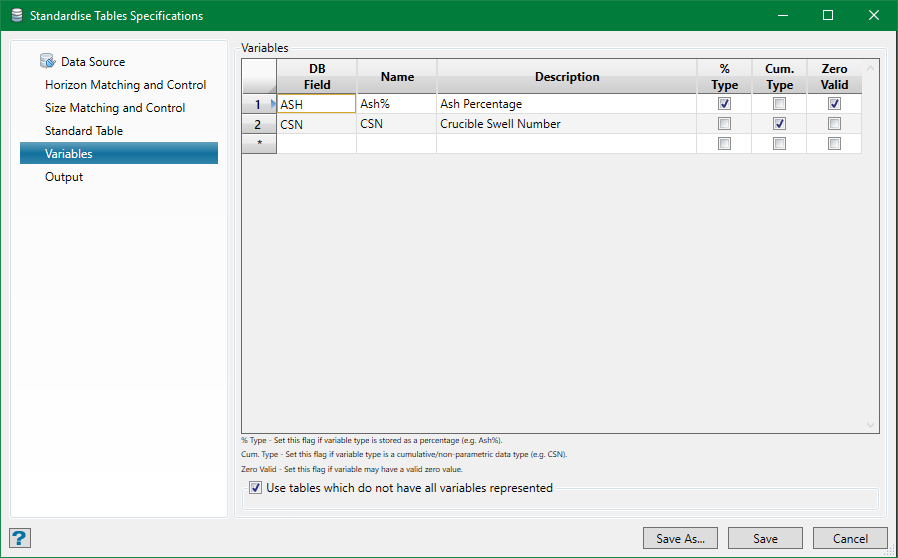
For all required variables, specify the DB field name on the Wash Record in the source database, give a name which appears in the wash table reports and graphs, and a full English description. The fields with checkbox are flags that inform the system of the expected behaviour of the data:
%Type
Select the ‘% Type’ field if the expected data is in the form of percentage values, for example Ash% (data will be validated accordingly).
Cum. Type
This flag signifies that data is a ‘cumulative type’. The standardised database always contains fractional data wash-tables, even if the source data was in the form of cumulative tables—the data being back-converted from the cumulative form. By selecting this flag, the cumulative values will be transferred to the fractional table or interpolated in their cumulative form.
Zero Valid
This flag indicates that zero values are acceptable. If not selected, this flag will cause any zero values (and the subsequent whole table for that variable) to be considered invalid and, therefore, not used.
Use tables which do not have all variables represented
If this option is not selected, it can create greater restriction on data validation. If any table for a fraction has invalid or missing data for one or more of the specified variables, it will be excluded. In most cases, this is too fluctuating as the modelling process should take care of the missing data by interpolating from the data available.
Output
The standardised wash table can be output to a database and/or a text file.
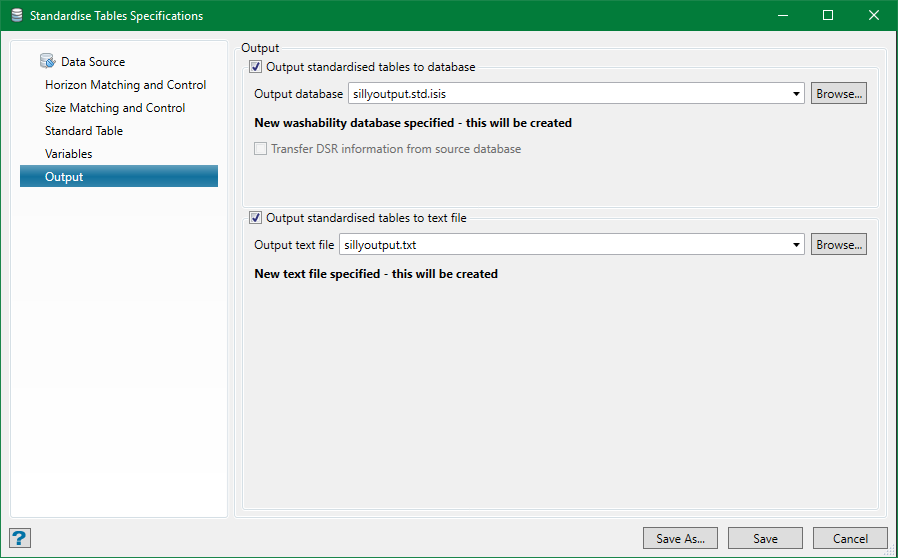
Output to database
This is the usual sink for the standardised tables. Select an existing database or type in a new name. You don't need to include the suffix as this will be appended automatically.
If you choose an existing database and it is compatible with these specifications (i.e. it has the same standard table structure and the variables defined include all of those in these specifications), you will see an option to update the existing database.
If the existing database is not compatible, the option will be replaced by a message: Incompatible washability database specified - this will be overwritten.
If a new database name is entered, that message reads: New washability database specified - this will be created.
Transfer DSR information from source database
This option will only be enabled if the source database has down-hole survey (DSR) information encoded in it (holes are considered to be vertical without this). Optionally, this information can be transferred to the standardised database for those holes which contain the standardised data. This will enable the resulting map-files and models made from this standardised data reflect the true position of the samples.
Output to text file
The tables may also be written to a text file if required. Select an existing file or type in a new name.
If you select an existing file, you will always see an option to append to the existing file. No compatibility check is made here and the output is simply appended to the file if the option is selected or else a new version of the file is written.
If a new file name is entered, the option will be replaced by a message: New text file specified - this will be created.
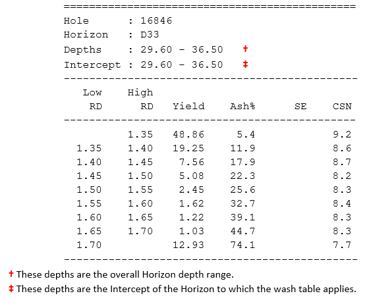
The standardised tables will be written to the text file in the following form:
Options
