

Edit Variable
Change the Variables of a Block Model Variable
Use Edit Variable to change the name, default value and description of a block model variable.
Instructions
On the Block menu, point to Manipulation, and then click Edit Variable to display the Edit Block Model Variable panel.
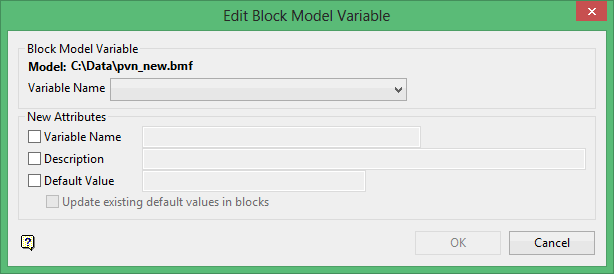
The directory path and filename of the active block model are displayed at the top of the panel. The block model name consists of the project code (<proj>), if specified, the block model file identifier (<bfi>), followed by the block model file extension (.bmf).
Block Model Variable
Variable Name
Enter, or select from the drop-down list, the name of the variable you want to modify.
New Attributes
Variable Name
Select this check box to specify a new name for the variable. The new variable name must not already exist in the block model.
Description
Select this check box to specify a new description for the variable. If this box is checked, and the description if left blank, the old description is retained.
Default Value
Select this check box to specify a new default value for the block model. Changing the default value does not change the values stored in the block model.
Update existing default value in blocks
Select this check box to update previous default values to the new ones when modifying the default values. The results of this operation are reported in the BMine tab of the Report Window.
Click OK.
