

Path
Set route for animation object
Use the Path option to assign an object to a nominated route (path). The assigned object is then created for each point along the selected route.
The new objects are assigned different group names that consist of a group prefix and a sequential number. As these objects are stored in a nominated layer, an animation can be created for that layer (using the Create option).
The Run option can then be used to show the object moving along the path.
Instructions
On the View menu, point to Animation, and then click Path to display the Animation Path Parameters panel.
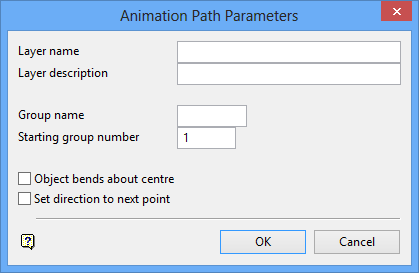
Layer name
Enter the name of the layer for the new objects. The maximum size is 40 alphanumeric characters (spaces are not allowed).
Layer description
Enter a description to further describe the contents of this layer. The description can be up to 80 alphanumeric characters and may include spaces. If a description is not entered, then a default description will be used instead. If the chosen layer already has an assigned description, the description displays when the layer is selected. Existing layer descriptions can be overwritten.
Group name
Enter the prefix that will be used as part of the group name (group name consists of <prefix><sequentialnumber>).
Starting group number
Enter the first number in the number sequence. The number is incremented by one to create the sequence.
Object bends about centre
Select this check box if the object to be generated along the path is articulated, for example, a truck, loader etc. Checking this check box will allow the object to bend around the corners.
Set direction to next point
