

Save Sequence
Save Selection Order
Use the Save Sequence option to save a sequence of polygon selections, so that polygon reserves are reported in the order that the polygons were originally picked. The Select Polygons option must be used to define the layer and objects for display.
If you used the Highlight Polygons option to select polygons, then the reserves are reported in order of polygon name, not in order of selection.
The format of the sequence file is:
<name>_seq.rsu_cmnd
Tip: To run this option from the command line, type:
SAVE_SEQ /SEQUENCE_IDENTIFIER='identifier'
for example SAVE_SEQ /SEQUENCE_IDENTIFIER='demo'
Instructions
On the Rsvute menu, point to Files, and then click Save Sequence to display the Save Sequence panel.
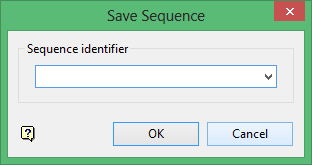
Sequence Identifier
Enter, or select from the drop-down list, the sequence name (full name is <name>_seq.rsu_cmnd). The drop-down list contains all of the sequence files found in your current working directory. If you specify the name of an existing file, then you are asked whether or not you want to overwrite this file.
Click OK.
The sequence file is saved in the working directory.
