

Open
Instructions
On the Gantt menu, point to Open, then select either New Project or Existing Project.
If you are opening a new project, the Gantt Scheduler interface will be displayed and you may begin creating your project.
If you are opening an existing project, then the following panel will be displayed.
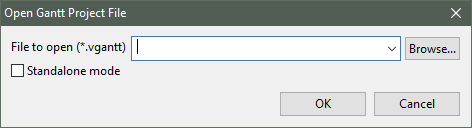
File to open (*vgantt)
Select the project file you wish to use from the drop-down list, or browse for it by clicking the Browse button.
Note: The drop-down list is populated with (.vgantt) files found in the current working directory. Files stored in other locations can be accessed by using the Browse button.
Standalone mode
Select this if you no longer need the connection between Gantt Scheduler and Vulcan. In some cases it can speed up the levelling computations.
Note: Two instances of Vulcan Gantt Scheduler cannot be open at the same time.
