

Add Station
Creates a user defined Survey Station (coordinate reference point) in the ‘User Stations Layer’ (defined in the User Stations Layer parameter in the Survey Station Layers section of the Global settings) and labels it. This panel will remember the settings from the last time the tool was run.
Instructions
On the Face Mapper menu, point to Mapping, then click Add Station.
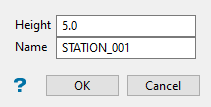
Enter desired height and name. Once OK is pressed digitise the new reference point on the floor string where desired (snap-to-objects mode should be engaged by default, to ensure the point is created in the right location). The above settings would create a survey station with the object name 150001.
Height
The height above the floor string the user wishes the point to be created.
Name
The object name for the created reference point.
Note: The text colour will be the default colour selected from your colour palette.
