

Full
Display Object and Point Details
The option is identical to the Analyse option under Open Pit > Range Diagram and Geotech > Section.
The Full option provides detailed information on objects and their points, for example enclosed area of an object, co-ordinates of vertices in both section and plan, grade of segments. The information displays in the Report Window.You can select an object and have its details reported and then select a line segment on the object to expand the information displayed.
This option can also be accessed by selecting the Full button from the Analyse toolbar.
Instructions
- Select Analyse menu
- Select Details submenu
- Select Full option
Select the object for detail information. The object is highlighted and its details displayed through the Report Window.
These details are specified when creating objects or when editing the object's attributes (see the options under the Design menu). Also shown are the total number of points in the object, the total length and the area. The area is shown even though you may not have joined the start and end points (as far as Vulcan is concerned, a string of points forms a polygon and therefore has an area). The length and area are given as measured in normal plan and rotated view. For closed polygons the actual perimeter length in 3D and in view is also shown.
Select a line segment on the object. The points at each end of it will be highlighted and their X, Y, Z and W values will be added to the display in the Report Window. Also listed will be the length of the line segment, its bearing, and gradient. The gradient displays as a ratio, angle of inclination (degrees or gradients) and percentage.
Continue selecting line segments or right-click to select another option (right-clicking twice will exit the option).
Note: Vulcan supports specification of grades, slopes and crossfalls in three ways - as decimal angular units, as a ratio grade specification or as a percentage grade. For example, the grades 4.573921, 1:12.5 and 8% all represent the same physical gradient.
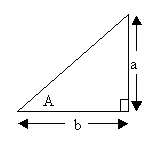
To represent a gradient we can use:
- Angle notation (decimal degrees or gradians depending upon your preferences), i.e. angle = A.
- Ratio notation where the grade is specified as the ratio of the sides a and b, i.e. a:b where a/b= tan(A).
- Percentage rise/fall notation where the grade = D%, i.e. a/b* 100%.
The following strings are all valid specifications of grade:
4.56446 0.03 -34.7 1:10 10:1 1:123.4 1:-10 5% 6.9% -4.0%
