

Freeze 
Freeze Objects
Use the Freeze option to prevent a selected object, layer, or underlay from being highlighted or edited. This is useful when there are a large number of items displayed and you don't want the risk of accidentally picking and editing the wrong item.
This option can also be accessed by clicking the Freeze button on the Visibility toolbar.
Instructions
On the View menu, point to Visibility, and then click Freeze.
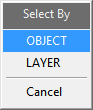
The Select By dialog box is then displayed, allowing you to select the items by layer or object.
Once an item has been frozen, it cannot be selected from the screen, edited, or highlighted.
Use the Visible option or All Visible option to highlight or edit a frozen item.
Was this page helpful?
