

Qualities
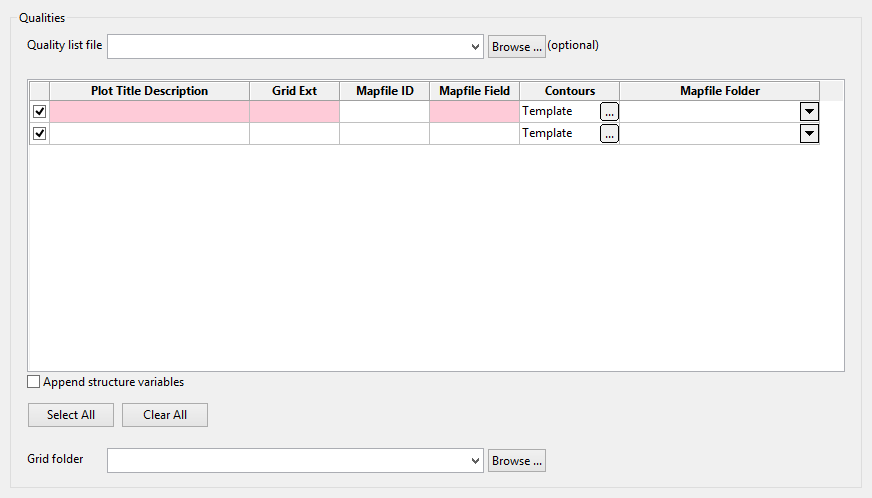
Quality list file (optional)
This field allows the selection of a ‘Grid Calc > Create Multiple Surfaces’ specification (.cms_spec) which will quickly populate the quality grid, after which any hand edits may be performed.
Quality grid
This grid contains the descriptions of all the qualities (and/or structural variables) which will be processed along with the seams from the ‘Seams’ tab.
Plot Title Description
This description will replace the template description field specified in the ‘Batch Plotting Template’ section on the ‘Template Details’ tab.
Grid Ext
This is the extension which will be used to generate the grid file name that will be contoured by the batch-plotting process:
The grid file name is composed as follows:
< Project Code >< Seam >.< Grid Ext >g
Mapfile ID
This is the mapfile ID that is used to generate the quality (and/or structural) mapfile name that will used by the data-posting process to produce a design layer that will be consumed by the batch-plotting process.
The mapfile name is composed as follows: < Project Code >< Seam >< Mapfile ID >. map
Contours
By default, the batch-plotting process will be contoured using the default contours specified in the template batch plotting spec (.dh2). However, since these defaults are unlikely to work for all qualities the user can override the defaults using this column.
Mapfile Folder
This is the (sub)folder containing the input mapfiles, whose names will replace the template default in the data-posting specification (.dps).
Append Structure Variables
Generally the user will use the CPB to generate plots of quality variables but occasionally the user may also want to plot the structure thickness for example. Selecting this check box will automatically append the following 6 structure variables to the list:
-
Structure Roog(SR)
-
Structure Floor (SF)
-
Structure Thickness (ST)
-
Coal Thickness (TK)
-
Midburden Thickness (MD)
-
Parting Thickness (PT)
Deselecting the check box will correspondingly remove the structure variables.
Select All
This button will select all listed variables for processing.
Clear All
This button will clear all listed variables for processing.
Grid Folder
This is the (sub)folder containing the grid files, whose names will replace the template values in both the data-posting (.dps) and batch-plotting (.dh2) specifications.
