

Edit Blast Holes
Selection Criteria
Use this to edit the values of loaded blastholes.
You can also edit hole collars by selecting the hole(s), right-clicking on them and selecting Properties from the displayed context menu.
Instructions
On the Grade Control menu, click Edit Hole Collars to display the Blast Hole Selection Criteria panel.
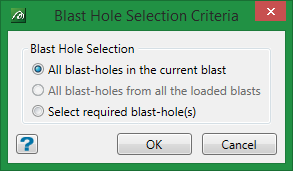
All blast holes in the current blast
Select this option to edit all blast holes in the currently active blast.
All blast holes from all the loaded blasts
Select this option to edit all blast holes displayed on the screen. This option is only displayed when more than one blast is loaded.
Select required blast hole(s)
Select this option to only edit a selection of the blast holes displayed.
Click OK.
Was this page helpful?
