

CRTR400
The following panel displays.
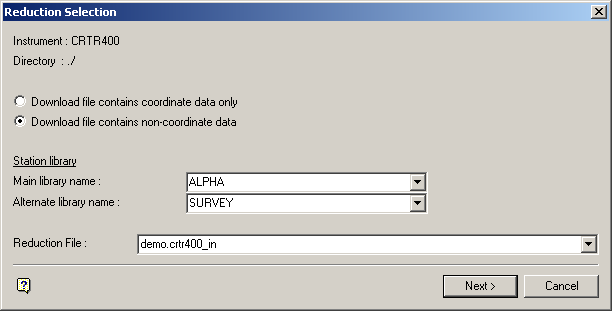
Reduction file
Enter, or select from the drop-down list, the name of the download file that you want to reduce. The drop-down list contains all of the download files that are applicable to the CRTR400 instrument, that is, files with the extension .crtr400_in.
Select Next.
The following panel is then displayed.
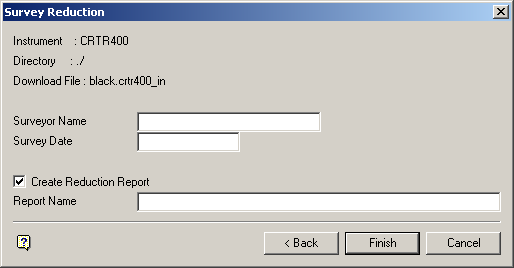
Select Finish.
The following panel is then displayed.
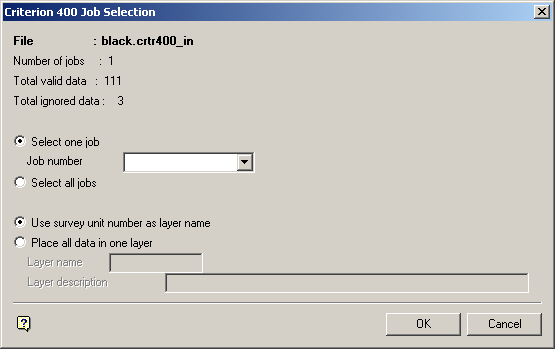
Criterion 400 Job Selection panel
The download file, number of jobs, total valid points and total ignored points are displayed at the top of the panel.
Select one job
Select this option to reduce only one job in the download file. If this option is selected, then you will need to specify the job number.
Select all jobs
Select this option to reduce all jobs in the download file.
Use survey unit number as layer name
Select this option to put the data points of each survey unit into separate layers. The survey unit number will be used as the layer name.
Place all data in one layer
Select this option to put all data points into one layer. You will need to specify the name of the layer (a maximum of 40 alphanumeric characters) and, if desired, a description for the layer (80 alphanumeric characters).
Select OK.
The following panel is then displayed.
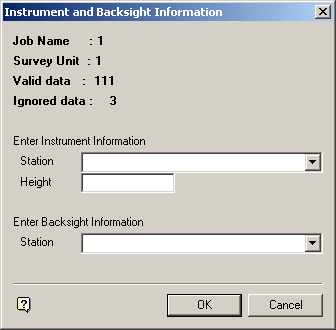
Instrument and Backsight Information panel
This panel displays for each job being reduced. Information about the job displays at the top.
Enter Instrument Information
The instrument station can be manually entered or selected from the drop-down list. The height also needs to be entered.
Enter Backsight Information
The backsight station can be manually entered or selected from the drop-down list.
Note: At each survey unit, the first foresight station data is read as backsight azimuths. Therefore, if the job has no foresight points in the file, you will need to enter the backsight azimuth (in the appropriate angular unit).
Select OK.
The calculated results are then displayed in the Report Window and, if required, saved in the nominated file.
See Appendix A for an example of a Reduction (SDR22) report.
Note: If the specified instrument and/or backsight stations cannot be found in the nominated libraries, then Manual Station Entry panel displays before the results are calculated. This allows you to manually enter the station's coordinates.
