

TOPCON TPS-7
The following panel displays.
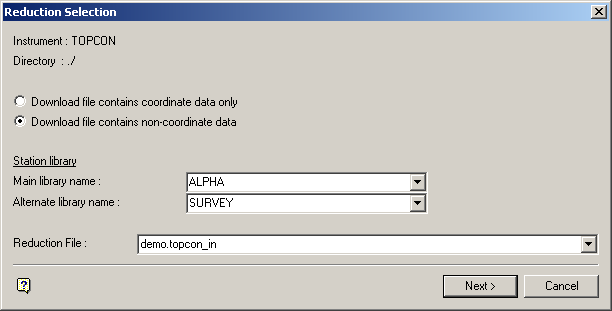
Reduction file
Enter, or select from the drop-down list, the name of the download file that you want to reduce. The drop-down list contains all of the download files that are applicable to the TOPCON instrument, that is, files with the extension .topcon_in.
Note: A TOPCON download file can only be generated outside of Vulcan. Refer to Appendix C for details on the format of this download file.
Select Next.
The following panel is then displayed.
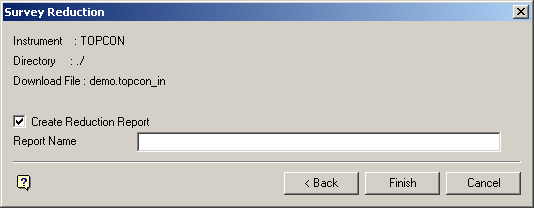
Select Finish.
The following panel is then displayed.
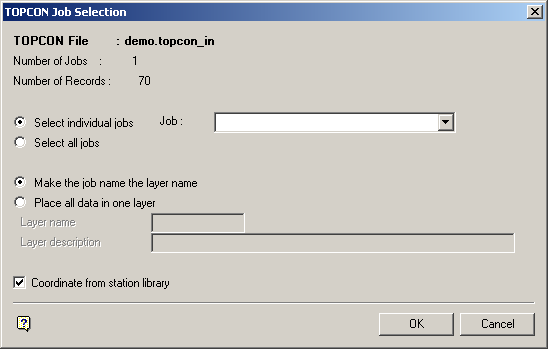
TOPCON Job Selection panel
The download file, number of jobs and number of total records in the download file are displayed at the top of the panel.
Select individual jobs
Select this option to reduce only one job in the download file. You will need to specify the job.
Select all jobs
Select this option to reduce all jobs in the download file.
Make the job name the layer name
Select this option to use the job name as the name of the layer into which the data points will be stored.
Place all data in one layer
Select this option if you want the data to be stored in one layer. You will need to specify the name of the layer (a maximum of 40 alphanumeric characters) and, if desired, a description for the layer (80 alphanumeric characters).
Coordinate from station library
Some raw data files include the station setup coordinates as an XYZ record. In that case, the reduction does not need to read a station library to get its required coordinates for the instrument station or backsight station. Check this check box to search the station library for station coordinates.
Select OK.
The following panel is then displayed.
The calculated results are then displayed in the Report Window and, if requested, saved in the nominated file.
See Appendix A for an example of a Reduction (SDR22) report.
